Schedule Facebook Marketplace pickups with one link
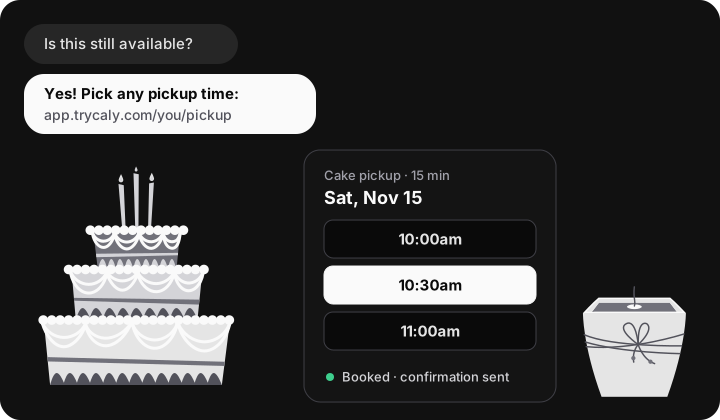
Answer buyers with a Caly booking link instead of a back-and-forth about times. They pick a pickup slot from the hours you actually have free, get a confirmation and a reminder, and can reschedule without messaging you. Made for home bakers, cooks, crafters and anyone selling things people come to collect.
Make my pickup link Free plan, no card needed.


Works in the chats you already use: paste the link into a Facebook Marketplace or Messenger conversation. Caly is a separate scheduling app with no Facebook integration; it never sees your listings or messages.
Where a Marketplace sale loses its time
Most of the work in a Marketplace sale is not the sale. It is the “Is this still available?” that arrives ten times for one dresser, the evening spent agreeing on “after 6, maybe 7”, the buyer who asks you to hold it and goes quiet, and the one who never turns up after you stayed in. For home bakers it is worse: a cake has a pickup time it cannot miss.
A booking link replaces the negotiation with a choice. You decide the windows once; every buyer picks from them. The first one to book gets the slot, and you have a name, an email and a time in writing.
Set it up in about 15 minutes
- Create a free Caly account and connect your calendar. Connect the calendar you already live in (Google, Outlook or Apple). Anything on it, like school runs or a shift, is hidden from buyers automatically.
- Turn your first event type into “Pickup”. Name it after what buyers come for (“Cake pickup”, “Furniture pickup”), set it to 10 or 15 minutes, and write where pickup happens in the description: the porch, the lobby, a public spot. Many sellers give the street and cross street here and the exact address in Messenger once a time is booked.
- Open only the hours you can really be there. Pickups go wrong when buyers propose times you then have to refuse. Set narrow windows instead: weekdays 5–8 PM and Saturday 10 AM–2 PM is a common pattern. Buyers only ever see those slots, minus anything already booked.
- Ask buyers to name the item in the notes. Every booking asks for a name and an email. Tell buyers in your reply to put the item in the notes field (“the walnut dresser”, “2 dozen lemon cookies”) so a booking is never ambiguous when you sell more than one thing.
- Save the replies below on your phone. Put your link into the templates on this page and store them as text shortcuts (iPhone: Settings › General › Keyboard › Text Replacement; Gboard on Android: Settings › Dictionary › Personal dictionary). Typing “;pick” then pastes the whole reply in a Marketplace chat.
- When a buyer books, mark the listing Pending. You get a confirmation email and the pickup lands on your calendar. Mark the item Pending in Marketplace so other buyers know, and keep the listing up until the pickup is done.
What the buyer sees
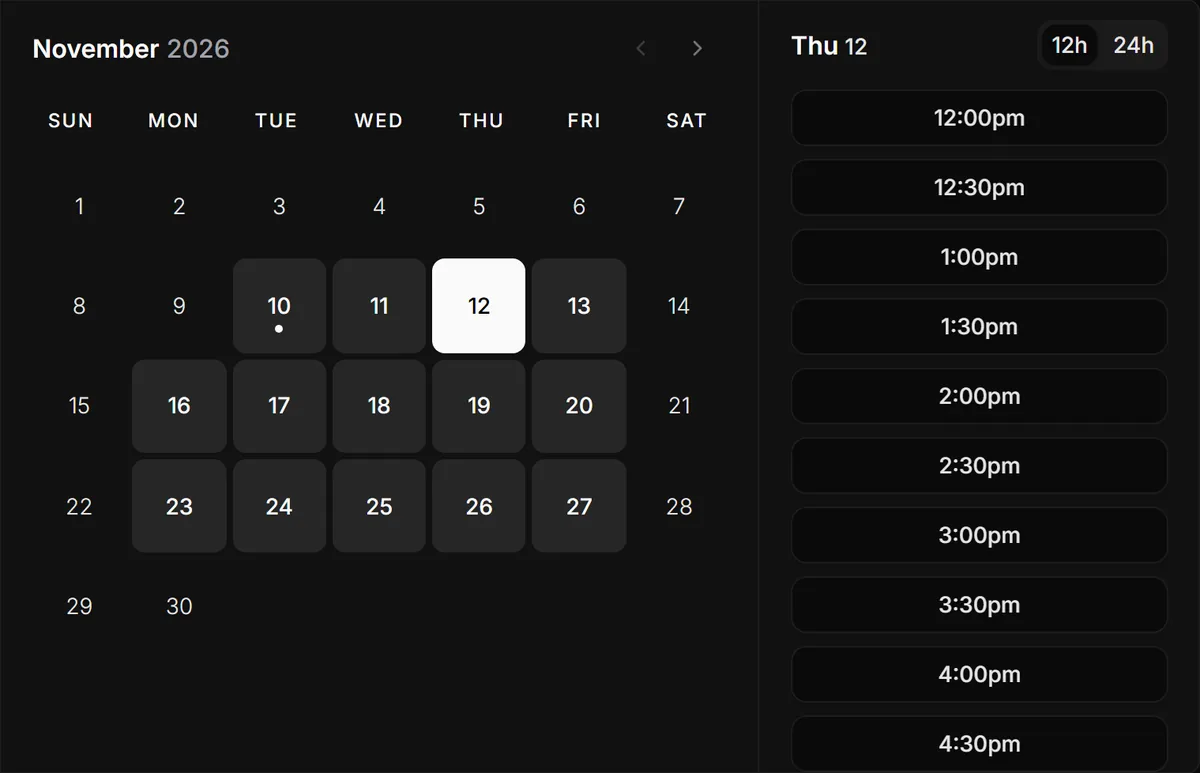
This is Caly's real booking page, captured from our demo account on 2026-11-10: the buyer picks a day, then one of your open times, in their own time zone. On a phone the times appear under the calendar.
Copy-paste replies for Marketplace chats
Replace the parts in [brackets] once, save them as text shortcuts, and answer every common message in two taps. They are short on purpose: buyers read them on a phone.
“Is this still available?”
Hi! Yes, it's still available. Pickup is in [area]. Grab any time that suits you here and it's yours: [your Caly link]. Please put the item name in the notes. You'll get a confirmation and a reminder before you come.
“Can you hold it for me?”
Happy to hold it once a pickup time is booked: [your Caly link]. I can't hold unbooked items because other people are asking, but as soon as you pick a time it's yours.
“Would you take $[less]?”
Thanks for the offer! The price is firm at $[price]; it's [made fresh to order / solid wood / handmade], and that's what it costs me to make it right. If that works for you, pick a pickup time here: [your Caly link]
A custom order (cake, catering, a commission)
I'd love to make that! Book a quick 15-minute call so we can go over size, design and date: [your consult link]. Custom orders need at least [10] days' notice, and I confirm once the deposit is in.
“Something came up, can we change the time?”
No problem! Use the reschedule link in your confirmation email and pick a new slot; your old one frees up on its own.
After a no-show
Sorry I missed you at [time]! If you still want it, book a new time here: [your Caly link]. If I don't hear back by [day], I'll put it back on Marketplace.
Pickup slots that cut down on no-shows
- Short slots inside fixed windows. Ten or fifteen minutes each, stacked inside the two or three windows you are home anyway. A buyer who does not show costs you one slot, and the next buyer can already be booked behind them.
- A confirmation in writing. The buyer gets an email with the time and your pickup notes, and the booking sits on your calendar. Nobody has to scroll a chat to remember what was agreed.
- A reminder before they leave. Email reminders are included on every plan, Free too.
- An easy way to change plans. The confirmation has a reschedule and a cancel link. Buyers whose day changed use it instead of disappearing, and a cancelled slot opens for the next person.
- No same-hour surprises (Pro). Minimum notice stops a booking for “in 20 minutes”, a daily limit caps how many pickups you take, and buffers keep a gap between buyers who should not meet in your driveway.
Custom orders: cakes, catering and commissions
A custom order is a conversation before it is a sale. Instead of designing a birthday cake across forty messages, give it its own event: a 15-minute call to agree on size, flavour, design and date (Google Meet links are included on Free). Caly sees your whole calendar, so consults cannot land on top of a pickup.
- Lead time. Write your notice period in the event description, and with Pro set it as a minimum notice so nobody can book a consult for a cake needed tomorrow.
- Two links, two jobs. A pickup link for ready items and a consult link for custom work keep the two kinds of buyer apart. A second event type is a Pro feature; on Free, start with whichever brings you more sales.
- Deposits. Say in the consult description that the date is confirmed when the deposit arrives, and take it the way you already get paid.
- Pickup day. Once the order is agreed, send the pickup link for the collection itself, so a three-tier cake is not waiting on a counter all afternoon.
Look organised, price with confidence
Buyers judge a home seller on how the sale feels as much as on the listing. A seller who answers in seconds, offers clear times and sends a confirmation reads as a small business, not a stranger in a chat, and that makes a firm price easier to hold. The “Would you take less?” reply above says why the price is what it is, then moves straight to booking. Keep the reason honest: the ingredients, the hours, the materials.
Your booking page shows your name, the event and your pickup notes. Pro adds custom branding, so the page can carry your shop's look; compare the plans on the pricing page.
What Caly does not do
- It does not connect to Facebook, list items, read chats or reply for you.
- It does not know which item a booking is for unless the buyer says so in the notes, and it does not mark listings sold.
- It asks every buyer for an email. If a buyer will not give one, offer two times in the chat the old way.
Questions
Does Caly connect to Facebook Marketplace or Messenger?
No. Caly has no Facebook integration: it cannot see your listings, read your chats or post for you. You paste your Caly booking link into a Marketplace or Messenger conversation like any other link, and the booking happens on Caly's own page.
Does the buyer need to sign up for anything?
No. The buyer opens your link, picks a day and a time, types a name and an email, and is done. The email is where their confirmation, reminder and reschedule link go.
What does it cost a Marketplace seller?
The Free plan covers one event type, which is enough for one pickup link, with email reminders. If you also want a separate custom-order consult, buffer time between pickups or limits on bookings per day, those are part of Pro at $12 a month (USD; local prices on the pricing page), with a 14-day trial.
Can two buyers book the same item?
Caly books times, not items: two buyers can never take the same slot, but it does not know which listing a booking is for. That is why the replies ask buyers to name the item in the notes, and why you mark the listing Pending in Marketplace after the first booking for a one-off piece.
Will this stop no-shows completely?
No, and nothing will. What helps is what the link adds: the buyer chose the time themselves, has it in writing, gets an email reminder, and has a one-tap way to reschedule instead of simply not showing up. Short slots in fixed windows also mean a no-show costs you 15 minutes, not an afternoon.
Can I use it for delivery instead of pickup?
Yes. Make the event about delivery (“Delivery window, 30 min”), open the hours you drive, and ask buyers to type their address in the notes when they book.
Can Caly take a deposit for a custom order?
Caly lists Stripe among its integrations for collecting a payment with a booking. Many home sellers keep it simpler and take the deposit the way they already get paid, then confirm the order.
Written and checked against the live app on 2026-11-10 by the Caly team. Plan details come from the pricing page; for help, see support.
Facebook and Facebook Marketplace are trademarks of Meta Platforms, Inc. Caly is not affiliated with or endorsed by Meta.